Showing posts with label iphone apps. Show all posts

Best Utility Apps for iPhone


Best Utility Apps for iPhone
While the iPhone is a great help to everyday life, it is necessary to check if its applications function up to its greatest potential. For as long as everything is up and running perfectly, you can enjoy every feature without a problem. To keep your iPhone’s functionality, here are some apps to use:

BatteryMagic

There is an icon on your iPhone screen that tells you how much percentage of battery is left. Once it reaches the lowest portion, it is a signal that you have to charge it. Indeed, the icon is a helpful warning sign but you ought to know that better battery consumption is what you can enjoy with the BatteryMagic app. The BatteryMagic app is free for the beta version and paid for the BatteryMagicPro version. This app provides an indication on how much battery is left for a specific running application such as Wifi, 3G Internet, Talk Time, Game Play, Stand-by Time, Audio Playback and Video Playback. For the pro version, you are able to check if the battery life is enough to show a full-length movie.

iNotify

Priced at 99 cents, iNotify is an application that allows you to check on important appointments or errands under your to-do list. This notification appears on your lock screen, therefore every time you take a look at your phone, you are reminded of the things you need to accomplish within the day. The iNotification can be easily customized. You can add or remove activities under the list.

AppBoxPro

AppBoxPro garnered a number of thumbs-up because of its multiple functionality. This all-in-one app provides a number of utility apps that are totally helpful and beneficial. AppBoxPro comprise of the following: currency converter of up to 195 currencies, clinometer, battery life, loan calculator, 52-language translator, holidays observed in 83 nations, flashlight with adjustable brightness, sale price calculator and tip calculator. The best thing is that this app costs only 99 cents.

Camera Flash and More

If you love taking photos, the Camera Flash and More App is a great feature to have on your iPhone. As you use this app in taking photos, you can increase or decrease the brightness of a particular photo. You can also use this app in customizing photos, making them black and white or in a sepia format. If you want to add some fun with your photos, this app allows you put some funky effect on them. You can get this app at 99 cents.

SpeedTest

If you think that your connection is running slow on your iPhone, it’s time to do a speed test. By downloading and installing the SpeedTest app on your device, you can check whether or not connectivity is running correctly as it should. In the case of getting very slow speed, you can get in touch with your ISP to report the issue. If you are getting good results from the SpeedTest, you can perform tasks requiring connectivity efficiently. SpeedTest is a free app. You can use this app at any time and place.

WiFi Locator

WiFi connectivity is what allows iPhones to acquire connection to the internet. Since 3G/4G/LTE is always difficult to obtain, the WiFi locator can be more reliable. By using this app, you can connect to any desired network as long as no password is required. You don’t need to walk around finding a good WiFi spot because the WiFi Locator will provide all the information on your screen through the maps app. The WiFi Locator helps you find the strongest signal and strength of network signals are sorted on your phone for viewing. Thus, you can easily determine which network to try first.

Your iPhone can truly do wonders as long as you have the right helpful apps in it. The best thing is that these apps are very affordable, they won’t break the bank.

Image Credit: KROMKRATHOG


Author Bio:
Bogdan Shumei is team leader at Top Net SEO corporation. Often shares his experience blogging.

Best Small Business Apps You Need To Know About

Below is an Infographic on "The Best Small Business Apps" you need to know about. Best Business apps for Brainstormin,g Customer Service, Cash Flow Helper, Package Tracker, File Sharing, Email Campaign Manager, Business Trip Organiser, Social Media Manager and Best Rolodex Alternative are Discussed in the following Infographic!


Best Small Business Apps You Need To Know About

Infographic By Irishapps

Apps To Make Free Phone Calls

Software to make free phone calls to any mobile!

Before the invention of smartphones and hi-tech mobile OS users mainly used their phones for calling and messaging. Since that time the call costs have been inflating. With improvement of technologies, the users are blessed with plenty of apps that they can use day today for varied purposes. One of the main purpose being free calls. With National and International call rates heavily shooting up the following Android Apps will let you to make free phone calls at a much less price (data connection charges/Wi-Fi charges alone).

The following are top free phone call apps for your Android/iPhone/Windows devices:

1. Fring:

Fring has a lot of great features that will make you go for it, ranging from free calls to normal chat to advanced video calling. Fring app now lets you also to append various other communication based services viz. AOL, GTalk. Also there is an option for connecting with your phone’s contact book thus letting you to talk with anyone with just one app.

However you can do the free call only when the other party has Fring app on their phone, which is obvious. This won’t be a big problem since the Fring app available not only for Android, but also on other operating systems like iOS, Windows, Symbian and also via a mobile browser.

Their latest feature is being capable of video calling between four people at the same time over any Wi-Fi or data connection. Albeit it’s fun to try this out, it looks a bit choppy too.

Additionally, you can call to regular phones also by buying some credits or points (similar to Skype) so you can now talk to landlines.

2. Line:

Line is the latest and very innovative app that lets users to make free voice calls for 24 hours a day. You can update your friends about anything and everything from your Android phone by using text, calls, photos, video calls, stickers and location info also. You can call all your friends from anywhere in the world and make calls internationally for free. Line is available in the Google Play Store for free download. Other noteworthy features are stickers, emoticons.

3. ooVoo:

ooVoo is a basically a video chat app that was developed by ooVoo corporation. You can view friends who use ooVoo and select their profiles for making video call, voice call or to send instant text or even video messages. You can make conference calls with up to 12 people at the same time. This app has options to save videos and photos that were sent by your friends. Speed dial option is present which will help you to keep up with five best friends while on the go.

4. Viber:

Viber is the most straight forward and hassle free app. All you have got to do is install this app and then it will search all the users in your contact box who use Viber and connect you to them. You don’t need nicknames or e-mail verification. You phone number serves as a unique user ID.

Put this app in your home screen and then use this as a calling function instead of your carrier based call and you are not only allowed to make free calls to the other Viber users but you can also send SMS to them. This is an efficient app to make normal SMS and calls and also email right from the app. The one thing that makes Viber outstanding is its call quality. The audio is very clear without any lags. It is so clear that you will think that you ate using your regular carrier phone line. This is a must have free call app on your Android.

The other free call apps include Skype, Tango, Tru App, Qik, Nimbuzz, Google Voice, ICQ, etc...


Image Credit: Tim Robberts.


Author Bio:
I’m Zoya Bennet, part of Contus mobility team and author of this article. I’m a passionate blogger interested in writing articles on professional android application development. I constantly offer technology-based solutions for the platforms iOS, Android and Windows.

Best Fitness Apps for Smartphone

Aside from all the useful and interesting things that smartphones are enabling you to do they are also quite capable of helping you stay healthy and active. Even though most of us know the value of workout and remaining active, not all of us can be bothered to actually exercise as often as we should. This is the greatest thing about apps of this type, while some of them simply give you instructions on how to do some exercises other are actually capable of making your exercise regime more efficient, or even helping you make it more interesting. Regardless of your preferred activity, you can be sure that there are at least some apps that could help you with your favored routine, and we have listed some that have been shown to be effective.

1) Fitocracy

One of the apps that is meant to motivate the user to work harder and strive for better results, Fitocracy does this by allowing you to share your results with the community of other users of this app. Regardless of your discipline, chances are that there will enough other users to create a healthy competitive atmosphere that will make you push harder to reach the top of the charts. Additionally, you also easily post your results on Facebook, informing your friends of your success. The app is completely free and is available for both iOS and Android devices.

2) MyFitnessPal

This app is more focused on your proper nutrition than the exercise regimes. It allows you to easily track your intake of calories, by offering a bar code scanner and a huge database of different types of food. It is great for keeping an eye on your calorie intake and really helps you reach your weight goals, without having to spend too much time on dealing with actual numbers. MyFitnessPal is available for both Android and iOS, and is absolutely free.

3) Nutrition Tips

Another app that is more focused on helping you with your diet decisions than your workout, Nutrition Tips gives you a bunch of useful advice on proper handling of your nutrition. The app is packed with interesting info on different types of food, and can really make a huge difference in your diet. This free app is only available for iOS platform.

4) Couch To 5K

A great instructional app that allows you to go from zero to running 5 km in no time. The app’s program guides you through a nine week regime that gradually becomes more demanding, until you are able to run the full distance with no problem. Apart from motivating the user, it also prevents you from straining yourself too much, or being too slow in your progress. Available for both Android and iOS, Couch To 5K is another amazing free app.

5) Workout Trainer

If your excuse for not exercising was that you can’t hire a private trainer and you simply don’t know how to do the exercises properly, this app maybe the thing that will finally make you start working out. It holds a database of all the exercises that you may ever need, with detailed and clear instructions of how to do them without injuring yourself or risk working out with no effect. Another free app that is available both on iOS and Android devices.


Author Bio:
Article by Samuel Evans blogger and writer . Samuel currently exploring everything related to mobile phones and gadgets.

Android Apps To Create Music


"Music is the language of the spirit. It opens the secret of life bringing peace, abolishing strife." Kahlil Gibran.

Everybody loves music. In one form or another we are all addicted to our favourite songs. Pop music, Hip-Hop, Jazz music or Rock'n'Roll – they are all great.

In recent years modern technology becomes more and more innovative. Especially when it comes to mobile devices such as tablets, smartphones etc..


Android Apps To Create Music

Android, iOS' biggest competitor, is undoubtedly the most popular platform for mobile devices. Every month they release thousands of new applications and always find a way to surprise us. Travel applications, which help you explore the most interesting and captivating places on Earth; business apps, which are must-haves if you are running your own business; educational apps; fitness apps; games... the list is so large that we can hardly find such a big variety of categories to classify all the different opportunities that Android offers us. Today we have decided to select for you the best music making apps. No matter if you are at home or on the road – these applications are amazing and you can be sure that you will spend hours enjoying your favorite hobby with them. Here is our short list:


1) PocketBand Pro

Here is our first suggestion! PocketBand Pro is an amazing application that allows you to “Build high quality tracks as a sequence of loops, mixing synths,drums, audio recordings, analog modulators and arpeggiators. Apply FX to channels and export to mp3 or ringtones. Also play and collaborate in our community.” (quote directly form Play Store). Unfortunately, it is not free – it costs $9.99, but it is really worth the money. It works on Android 1.6 and above and it is among the most popular making music apps.

2) Image-Line FL Studio Mobile

As almost every other Android application, this one has an iOS twin too – FL Studio Mobile. However, the interface is a bit different. It has a wonderful selection of built-in sounds and gives you the opportunity to create your own tracks. All you need to do is let your imagination fly and put all of your creative ideas in practise. The application costs only $19.99 and runs on Android 2.3.3 and above.

3) Solo

Apps To Create MusicHere is another fantastic program. If you love playing the guitar, then this is the best choice for you. Solo gives you the opportunity to carry your own guitar everywhere you go. Classical guitar, electric guitar, acoustic guitar – they all sound realistic. You will spend hours creating your own projects. Also, the app will show you the exact place to put your fingers. After the latest updates, Solo has added toddler settings and variable auto strum speed. It is the cheapest application in our list – only $3.99 and works on Android 1.6 or later.

4) Caustic 2

We left this one for a dessert since it is our favourite. Inspired by synthesizers, this great application has a wonderful design. And although the overall interface looks a bit complicated, once you download it you will see that in fact it is very easy to use. The program is absolutely free and runs on Android 2.1 or later.


Author Bio:
Rose Finchley loves to write about technology. She works in the support team of http://www.perfectcleaning.org.uk/end-of-tenancy-cleaning-hornsey-n8 and she loves her job.

3 iPhone Apps that Give You the Chance to Earn Money


Apps that Give You the Chance to Earn Money
iPhone app developers are not the only ones who can make money off of their applications. Some apps for iOS can actually help users earn money, as well. That said, if developers want to earn the most money, they need to make sure they employ the right marketing strategy. For instance, appnext.com is a leading social and mobile advertising network. appnext iphone ads can help developers make the most money possible through their smart targeting technology and advertising tools.

However, if you're a mobile user looking to gain a bit of cash or rewards from your apps, the following are some iPhone apps with these perks.


1) CheckPoints:

Earn points when you check into shopping malls, cafes, grocery stores, etc. To earn points that can later be redeemed for rewards, such as gift cards and other merchandise, scan the items you purchase and refer friends to take part in CheckPoints.

2) EasyShift:

Receive simple assignments and complete them (i.e. taking photos, giving an opinion, etc.). You are paid via PayPal after completing several tasks. The more you do the more you earn.

3) App Trailers:

Preview app trailers and obtain points for your efforts. Not only can you make your opinion count and assist app developers in improving their apps, but you get paid for viewing or tying out a demo.

Other rewarding apps include:

Gigwalk, Shopkick, Phewtick, GymPact, Field Agent, and Iconzoomer.


Image credit: thanunkorn.

How To Take 36 Hours Instead Of 24 From Your Day


In the age of modern life, everyone faces short of time problem to do various tasks within 24 hours. As many tasks are required to be completed every day in just 24 hours, and sometimes this time limit seems insufficient. One may need more than 24 hours accomplishing all the tasks successfully. With the growing use of computers and their applications, various tasks can be completed in a short time. The latest innovation of iPad and its applications helps one out of such a tricky situation.


Evernote Application: Organization and Keeping Track of appointments

It seems to be of great help when your daily routine is busy, and one is not able to keep track of appointments. You have to struggle not to miss any appointment. The freely available software, Evernote helps you stay perfectly organized and not miss any appointments. This program is easy to use by voice recording of notes, appointments etc.


Accessing your files:

It acts as a file organizer by adding files to the Dropbox and then sharing your files, photographs, documents and videos with anyone whom you give access. Full safety of the data is ensured by this free application, with 2GB of storage space.


Reminders-Basic edition:

This software helps you in remembering your appointments, by saving a memo with beep time. Basic version is free and limited to three reminders, upgrading to the full version costs $1.99.


Last Time : Track your important events

It helps in categorizing, your time on critical issues. It is done in terms of time management and gets balanced in all areas. It costs $1.99.


Awesome Note HD : To do a calendar

It helps in keeping track of your thoughts and ideas, remembering birthdays. Along with Evernote, it is a substantial attraction with password protection costing $4.99.


Complete workspace:

It helps in organizing your tasks by power to stay on time and guides by indicating set start and due date reminders. It costs $39.99


Personal Finance:

This free application tracks the spending of your money by simply linking your bank accounts. It monitors and sets the budget.


Amazon Mobile:

It is a perfect application for guiding you in purchasing gifts/presents with an instant access to the shopping cart, payment options and tracking delivery schedule. It costs $0.99.


MSpy Mobile app:

The mSpy mobile tracking application allows users to monitor calls, text messages, chats, emails, internet browsing history, videos, images, scheduled events, and notes on a particular device. Its integrated GPS feature allows users obtain an accurate location of the device. This makes it easy to locate the device in case it is stolen or gets lost. Its remote data wipeout and phone locking features guarantees that personal data will not be compromised in case the device is stolen.

Travel Organizer:

This free application is a trip organizer tool and wonderfully helps out with the finalization of the finances and gift options in control; you may be planning for a trip. 


Sticky Notes for iPad:

This application is a very energetic and convenient way to stay organized. It comes in different bright colors and fonts with voice dictation. It costs $0.99.


Habits Pro - Organizer for Goals, Tasks and Health Tracking:


Habits Pro software, with password protection, assists you in living a healthy lifestyle and is as organized as you want.


WiFi Finder:

The WiFi finder application requires you to explicitly click the button to call the WiFi site to search and access for free WiFi anywhere in the world.


(RTM)

Remember The Milk is everywhere you are and feature packed program is able to perform the to-do list organizer the way you need to do with priorities. You can also look at the tasks nearby and plan the exercise in the best possible manner.


250,000+ Recipes and Grocery List:


BigOven, with more than 250,000 recipes, is the perfect cooking tool. It has been awarded the "Best Applications for Foodies, for New Moms and for Eating in", award by well-known publications. It can be used all the time for menu planning, grocery shopping and cooking in the kitchen. The beauty of the software lies in the fact that you can make your own hand written recipes.


Author Bio:
Post by Susan Hampton . Ad coordinator for Mspy , blogger who writes about different useful apps, software and methodology for better and easier life.

How To Get More Done With An IPhone

Best Iphone apps for life
Bet you didn’t know that your swanky new iPhone could actually change your life? Whether you are a disorganised mess or someone who prides themselves on their incredible tenacity and organisation, there will be an app to help you.

The great thing about the iPhone is that there are so many apps to help you in life. From shopping and fitness to online banking and organisation. So, here are a few of the best iPhone apps out there to help you get more done.

1) Remember the milk:

The very aptly titled app allows you to take your tasks anywhere you are. You can complete the tasks you set up for yourself and check them off on your app, order them according to work, home, school or personal, add priority and plan your day better. Dates, times, lists and so much more. And what makes it even better is that it is a free app!

2) A Personal Assistant:

Do you have hundreds of accounts with passwords and usernames? Struggling to keep up with them all? Then you need A Personal Assistant. This helpful app allows you to access and manage all of your online accounts in once place. A free app that adds your bank accounts, social media accounts and even Amazon and Netflix account details in one place. Worried about your iPhone getting stolen? Well, firstly make sure you have iPhone insurance, but you should also note that this app uses 128 bit SSL encryption which essentially means that you can remotely disable access should your iPhone get lost or stolen.

3) iTimeSheetLite:

If you need to keep track of hours worked on projects, billable hours or notifications regarding work then you need the iTimeSheetLite. This free app allows you to add a task, insert it into your calendar, select if the task is billable, set the task start and end time and add notes. There is also a more advanced version for $5.99.

4) Any.do

If you love a list then you will love Any.do. List-making and task-management is what it does best. It is ideal for organizing your calendar and assigning work tasks, travel and even shopping. It is also another free app.

5) Dragon Dictation:

If you don’t have time to transcribe your notes then don’t worry, Dragon Dictation will do it for you. It will transcribe whatever you speak and it is pretty darn accurate too. So, even if you can’t be bothered to type your next tweet, you can just tell Dragon Dictation and it will do it all for you.

There is a whole world of organisation out there for you to get on board with. Gone are the days of sticky post-it notes adorning your desk or a filofax that is falling apart at the seams. Just a bunch of amazing, and mostly free, apps that will get your life on track.

Why not head to the app store now and check out a few of these apps? Why not opt for the free ones first? You have nothing to lose.

Image Credit: sippakorn.


Author Bio:

Bill Turner lives with his dog on the South Coast of the UK, long walks, gadgets and technology, that's the life.

Best Smartphone Apps for Road Trips


Best Smartphone Apps for Road Trips
You're excited to pack up the kids and the car for a trip, but which apps will help you save time, money and hassle? What about finding things to do along the way? This list will get you started.

Google Maps:

It's pretty much a given that you're using Google Maps if you own an Android phone. You can set your home, look up businesses in a location, get directions by car, foot or public transportation and check into places once you arrive. Google Maps now included information such as hours of operation for businesses, which is great when you head out of town.

GasBuddy:

This app can literally save you money on your road trip by helping you to find the cheapest gas stations around. You know how expensive it might be to fuel up at a truck stop gas station right off the highway, and GasBuddy can take you directly to the station that will be nicest to your wallet. You can also log on to GasBuddy's website, which is mobile friendly. If you're interested in helping the community, make sure to update prices from your local gas stations.

TripAdvisor:

If you're going to need a hotel to stay at, the review system from other users on TripAdvisor is a boon. Aside from hotel information, you can find recommendations for hotels and local attractions if the family it looking a little bored with your itinerary. You'll find that the app is less cluttered than some alternatives, so it's easier to find exactly the information that you want.

RoadTripBingo:

You probably remember playing the license plate game as a kid when your parents were behind the wheel, so why not offer something for your children to do as you drive across the state or country? RoadTripBingo is that app, which encourages youngsters to find various items as you drive and then shake the device to clear the screen. Even Mom and Dad might get in on the fun.

Roadside America:

Perhaps you're the type of person who cares more about than the journey than the destination. If that's the case, check out Roadside America, an app that points out the crazy tourist destinations along the way that you may have missed if you simply stuck to GPS. You can subscribe to any or all of the six regions, which offer over 6,000 attractions from balls of twine to the world's largest six pack (of beer). Roadside America includes user reviews, so you know what to skip. Addresses, prices and other helpful information are offered in this app and on the Roadside America website.


Of course, plenty of other apps exit. Yelp and UrbanSpoon offer reviews of restaurants and other businesses that you might frequent while on vacation, and OpenTable allows you to make reservations for your party. If you're planning to cross borders, iTranslate can help you get over the language barrier, too. Most of these apps are free, so don't feel bad if you don't love them.


Image Credit: digitalart.

2013′s Best Apps for Lawyers


2013′s Best Apps for Lawyers

Every year, lawyers rely less on pen and paper and more on digital devices. The ABA Legal Technology Resource Center estimates that 91 percent of lawyers use a smartphone. With this growing smartphone usage in the industry comes its own ecosystem of apps for legal use—some of them made for the average consumer and others tailored specifically for lawyers.


Cloud Storage - Dropbox (Free)

Cloud Storage - Dropbox (Free)
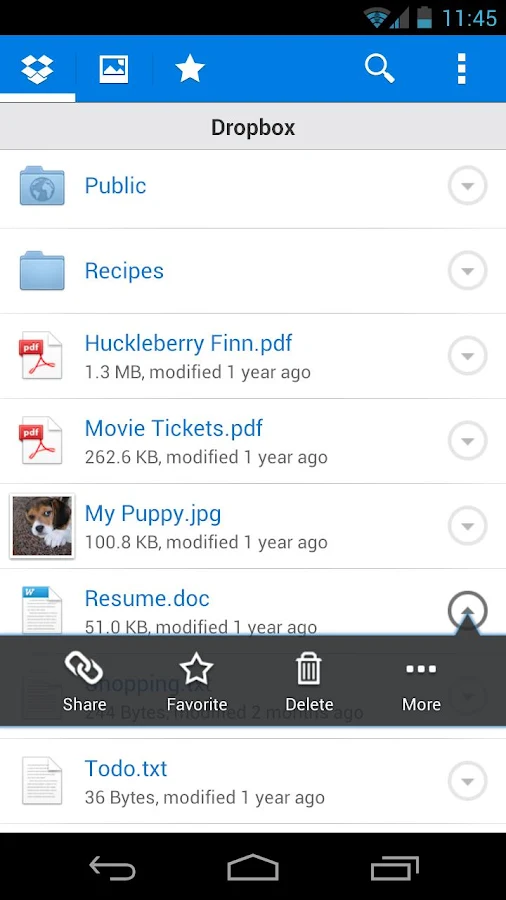
In a Lifehacker survey, Dropbox was named the most useful cloud storage app by more than half the votes. The service offers 2GB of free storage with the option to upgrade, and it has clients for almost every platform (Android, iOS, Blackberry, Windows, Mac and Web), so your documents are accessible from virtually anywhere.

Files are also stored behind an SSL and AES-256 bit encryption as well as optional two-step verification. So no one is looking at those documents but you.

Text Messages - Go SMS Pro ($1.99)


Text Messages - Go SMS Pro
Recording and documenting text messages is important for lawyers and Android's basic SMS app falls short on this front. The premium version of Go SMS Pro lets you store messages both locally and on the cloud (like a Dropbox account). So if your phone eats it, you can restore every message without a hitch. The app also carries handy features like speech-to-text and play-back when your hands are tied.


Notes - Evernote (Free)

Notes - Evernote
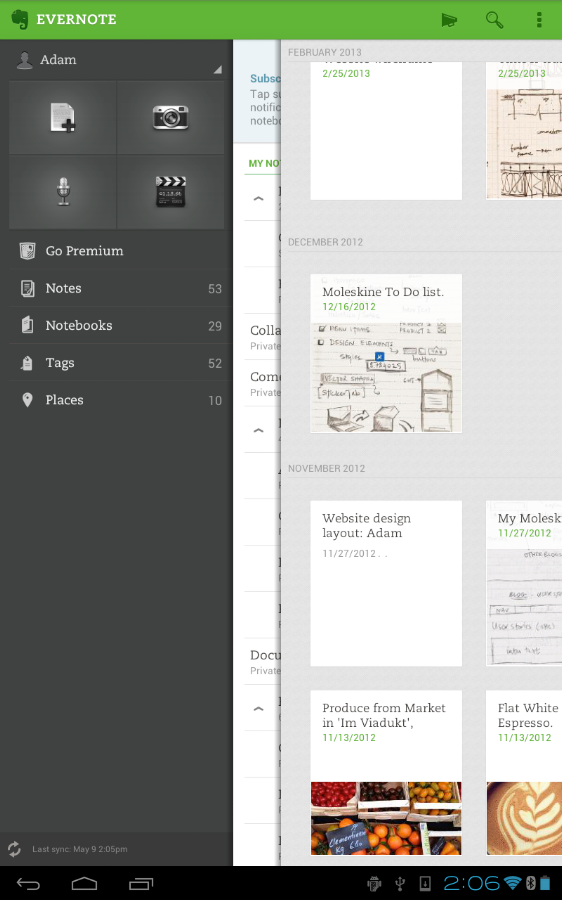
Like Dropbox, Evernote is the most popular and comprehensive app of its genre—it has clients across all platforms, starts you with a free account, and can organize notes with text, voice, pictures and videos. All notes are stored on your account so in case your phone is lost or stolen (and yes, it's password protected) you can still restore everything to a new device.

Legal Research - WestlawNext (Free With Subscription)

Legal Research - WestlawNext (Free With Subscription)

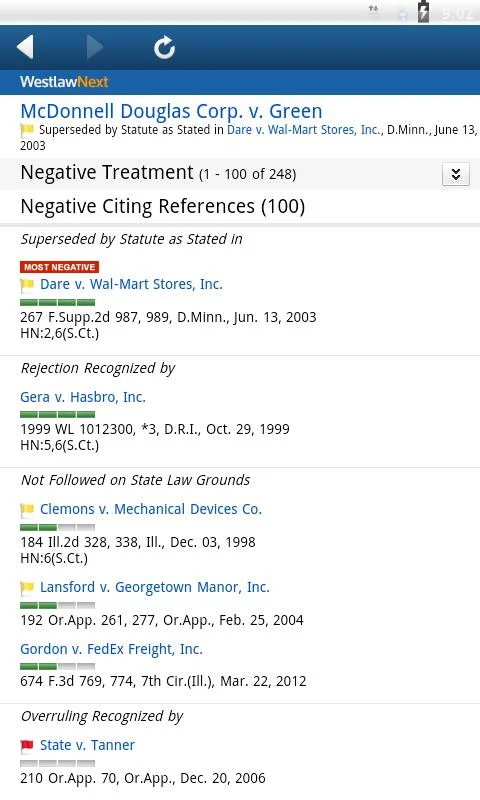
If you have a WestlawNext account, they've made an intuitive app to give you legal access on the go. There are a handful of legal research apps that yield the same info, but this one offers a better interface and usability. This makes it perfect for anyone, from a senior partner like Bob Bratt all the way down to a local county clerk.


Remote Access - LogMeIn Ignition ($29.99)

Remote Access - LogMeIn Ignition

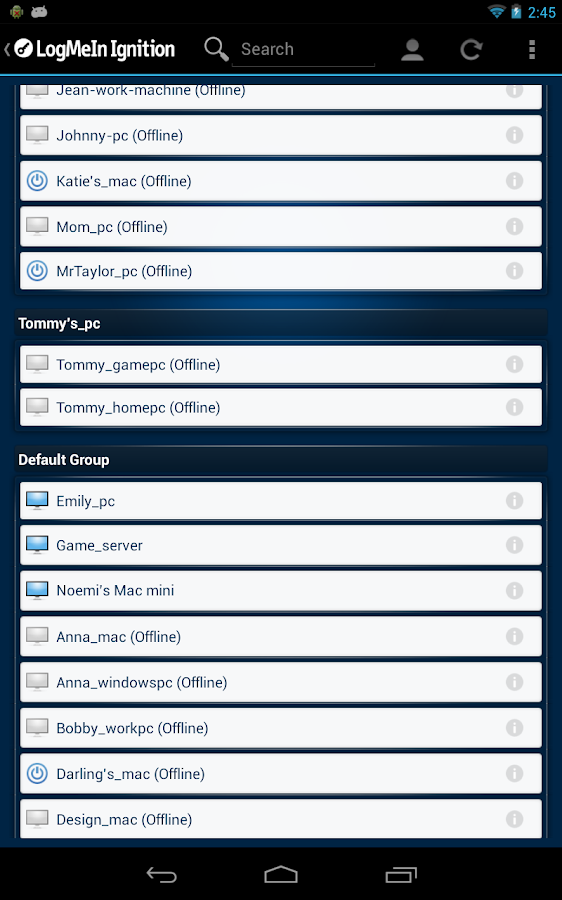
We've featured it before, but in two years no other app comes close. Thirty bucks is a small price to pay to use a remote access app that works across all platforms and is extremely user-friendly. You can look through your home files via a directory or screen share your desktop. The free account is all you need for these features and there's just nothing else that can match this price.

Tips To Choose Spy App For Mobile Phone Tracking


Spy App For Mobile Phone Tracking
Finding a perfect mobile phone monitoring software might be a difficult task because there’s so many different solutions online these days. The biggest problem most people face is that they only need one good app and with so many choices it’s hard to find the one that best suits your needs. With so many misleading information and web sites that often confuse you instead of making your choice easier it can be difficult do actually find out which ones are good and reliable apps and which ones offer everything you need. With a few guidelines you can find here it will be much easier for you to actually understand what to look for in a good monitoring app.


Avoid free software:

Monitoring apps are state of the art software solutions whose development costs money, so keep in mind that there’s no reliable free software out there. There are a lot of web sites that will offer you free monitoring apps but don’t trust them, because they are only trying to keep you on their web site or trying to get to your credit card information. If you find a web site that offers a free trial of a monitoring software, without asking you to give them your personal and credit card information, than it might be a good idea to try these apps. This could be a good way to find out if this is the best app for you.


Price is not the most important thing:

It’s understandable that you want to find a perfect app without having to pay a lot of money for it, but keep in mind that cheaper is not always better. You should first find out what does the app offer, does it offer everything you need or maybe more than you need. If you want an app with good value rates, check for mSpy app. Once you define what you actually want from a monitoring software then finding something that will stay within your budget should not be a problem with so many solutions out there. Do some research if you don’t want to pay an app that’s cheap and useless, or overpay an app with more features than you need.


Available features:

When you find a potential solution for your monitoring software always go to the app’s web site and check all the features it offers. Some of the products offer a lot of different features and advanced options and some of them only offer some basic and standard features. You should always consider what do you actually need and what exactly you want to monitor on a desired smartphone. If you just want to know with who the owner of a targeted phone is talking to or sending messages to than a basic monitoring app is enough for you. If you need additional options you should go for the advanced apps.


Recommended: How To Launch Parental Control On Different Platform.

Check compatibility:

This is an extremely important thing to check if you want your monitoring app to work at all. Many developers are saying that their app are working with all phones but this is mostly not true. Usually the majority of these apps are compatible with Android powered phones, iPhones and Blackberries. It’s also important to check if the app you want works not only with the operating system on the phone but with the version that it’s used.


Customer support:

Always choose apps that offer customer support. There’s no use in buying an app without being able to contact someone if something goes wrong. Reliable monitoring software developers always have customer support for their products, usually via phone, e-mail or live chat. Avoid developers that don’t offer adequate support for their apps.

With these guidelines and some research on your own you should be well informed in order to find a perfect monitoring software that will suit all your needs.


Image Credit: David Castillo Dominici.

Best Picture Sharing Apps of iPhone And Android


Nowadays image Sharing is kind of Common. There was a time when Digital Cameras were used for this purpose however now most of Smartphones features a nice camera to capture a stunning image.. However simply taking photos isn't enough, everybody desires to Share their photos with their friends and family, therefore here are some applications that can be used to share photos from your Smartphone. Whether it’s a iPhone iPod or iPad or an android Smartphone.

Flickr:

Picture Sharing App - Flickr

Flickr is a picture sharing and video Sharing App, it's a cross platform app that can be used from Windows also as From Smartphones, it has been taken by Yahoo In 2005. Its network has countless photos which you can like or share.

Wink:

Picture Sharing App - Wink

You have Personal photos and you only wish to share with somebody special in your contacts. Here let me present you the right app. As it’s a personal image sharing application. From this app you'll be able to directly share photos along with your specified contacts. It conjointly syncs your contacts from your phone memory therefore you don’t need to Add individuals on your own.

Instagram:

Picture Sharing App - Instagram

Instagram is a image sharing, video sharing and a social Application, from this photos may also be shared to other social networks sites like Facebook, twitter, Google+ and tumbler. it had been created in October 2010 and its one of the foremost quick growing application; In august 2011 instagram proclaimed that a hundred and fifty million photos were shared through instagram. You can also edit your photos and apply numerous different filters to your photos before uploading or sharing them. Photos can be liked and commented upon; its platform it very tempting and this application is used from Windows and Android and iOSSmartphones.

It’s a free app,In both PlayStore and iStore.


Photobucket:

Picture Sharing App - Photobucket

It’s a image sharing application only for android users and it's expected that its IOS version is going to be released shortly; as it’s a really far-famed and quick growing application for videos and image sharing, its one among the numerous advantage is that you can link the uploaded photos to Numerous other websites, it’s a cross platformapplication; you can use it on windows and your smartphone or tablet, image can be edited with a lot of filters present in the tools and another awesome feature is that the you can combine your different pictures to create a combo image. It’san extremely nice application that can be used for sharing photos along with your friends and family.

SphereShare:

Picture Sharing App - SphereShare

Sphereshare is presently an android application however it'll be shortly launched for IOS.. Its speciality is that you just can upload panorama photos from your android smartphone or tablet and share them along with your friends and family. Photos of 360 degrees can also be uploaded and there is a option to see them in 3D, which make them look real. Photos can be liked andyou can comment on them and you can upload and download the images and share them on social networks sites like Facebook, twitter, tumbler and Google plus. And you'll be able to also check in at some city or area through this app with yourGoogle account


Author Bio:
Written by Abdullah Akbar .. Blogger at www.techbeasts.com.

3 Apps Every Parent Needs


Becoming a parent will make your life incredibly, significantly busier - no doubt about that. I grew up in a large family so there was always some sort of chaos with the younger kids. If it be potty training, what they needed to eat, cleaning up after them, making sure they were doing their homework, or whatever else, there is always something to do. Although there is good news and there is help! If you know where to look, there are many tools available to help you with your kids. Here are a few apps that can offer some help to a parent in need.

1.) Fooducate

Not only can this app be helpful to you and help you lose weight, but if you're concerned about what your child is eating this app is just for you. In this app you able to grade you food and tell you whats really in it. You can scan a product and then it will tell you the real ingredients and how healthy it really is, and then give you a healthier option of what you could eat. This has the largest market available of UPCs with over 200,000 products ad more being added. This app was rated as the number one iPhone Health and Fitness category in the Apple App Store, 1st Prize in US Surgeon General Healthy App Challenge, and was even featured on Oprah, ABC, FOX, and others. This is a fantastic app for anyone wanting to keep a close eye on what they eat and what they're feeding their children.

2.) alarm.com

This app is great for anyone with a family. What this app does is it links up to your home security systems and allows you to monitor and control every part of your home security system from the app. You can control the lights, unlock or lock the doors, control the thermostat, and even set up certain wall plugs to be turned on or off from the app. So if you accidentally left your curling iron on you could turn off the wall plug from your app. This app is perfect for anyone that has babysitters as well. The app can also link up to any home security cameras you have so you could keep a close eye on you kids and your babysitter at all times.

3.) 2Do: Tasks Done in Style

Moms are known for their multitasking, but all that mental energy and trying to remember everything can bring on a lot of stress and frustration. With this app you can sync all of your to-do lists in one place. This app can go from a simple checklist - to a huge project manager. It's incredibly easy to use and allows you to prioritize your to-do list so you don't get anything mixed up or misplaced. It can sync from your dropbox, iCloud, Yahoo, and a lot more. You can even tell Siri to remind you of something and it will sync to this app.


Author Bio:
David Michael LeMarr is a musician, blogger, public communicator, and future architect - follow him on Twitter // Facebook // Wordpress.

Top iPhone Apps for Parents


Being a parent is a full-time job – times 10. There are never enough hours in the day to do all that you need to do, both for your children and for yourself. You need all the tools at your disposal you can get to help you manage it all and to accomplish even a fraction of what you set out to do.

Your iPhone is a great tool, and you can use it to stay in touch, to keep organized, and to stay on top of your to-do list. With the right apps, you can do much, much more. Here are a few of the top iPhone apps for parents to help you manage it all a little easier:

1.) Baby Connect:

When you have a newborn baby, your days are a blur of feedings, diaper changes, rocking, and crying (often your own). This app can help you to keep track of it all when you can’t even keep track of your own thoughts. You can track feedings, diaper changes, sleeping schedules, medicines, and even the mood of your baby. It will help you to monitor your baby’s progress, to establish schedules, and to diagnose any illnesses that might arise. You can also use the app to share the information with other caregivers. $4.99.

2.) Potty Chart:

Potty training can be a trying time. With this app, you can manage it a little easier. Use it to create a reward system for your toddler to encourage potty usage. You set a number of stars to reach a reward, and then mark off a star each time they use the potty. The app also provides tips on how to manage potty training, gives you ideas for rewards, and offers troubleshooting solutions. $2.99.

3.) Chore Bank:

For older children, you might need a little more than a reward chart to get them motivated to do chores around the house. You can use this app to keep track of who has done what and how much they have earned in allowance as a result. It creates a kind of virtual bank account for your children, and it’s an easy way for you to track who is doing what. $1.99.

4.) Bank of Mom:

Your children are likely to get money from other avenues besides their allowance. For example, they may get money for their birthday or they may have a particularly good run with the Tooth Fairy one year. You can use this app to help them manage their money and to teach them about financial responsibility. You can track expenses, deposits and withdrawals, and even add interest. You can even e-mail them receipts. It’s a great way to start teaching them about how to manage their money wisely. $1.99.

5.) How to Cook Everything:

Even if you have a partner who loves to cook, let’s face it: As a parent, you’re going to spend a lot of time in the kitchen. Instead of stocking your shelves with lots of bulky cookbooks, you can use this app to quickly look up how to cook just about anything. There are 2,000 recipes so you can be sure to find something that even your kids will love each night for dinner. $4.99.

What are some of your favorite apps as a parent? Share your picks in the comments!


Author Bio:
Bridget Sandorford is a freelance blog and culinary writer, where recently she’s been researching on line cooking school. In her spare time, she enjoys biking, painting and working on her first cookbook.

Top 5 Investment Apps


Top 5 Investment Apps
Creative Commons image source
Technology is more than a source for investments that have the potential for big payoffs in a short amount of time. Technology is providing us with tools for smarter investing in other areas of finance, allowing virtually anyone to track prominent trends, quickly make trades, and put money to work efficiently on the open market. One of the fastest growing forms of this type of technology is coming in the form of Apps for smart phones and tablets. Because more and more people are making their trades on the go, the following Apps are ideal for investors of all experience levels who do not want to necessarily be tied to a desk.

Motif Investing:

Available in both a desktop format or as an iPhone App, this free software streamlines one's portfolio and is capable of creating over 90 different themes. It handles 30 stocks per portfolio well, encouraging users to funnel their investments into more concentrated areas of the market. Each portfolio comes with a $9.95 charge, and the minimum investment amount is $250. This App is not geared towards the long-term investor, but it is perfectly designed for the day trader or those wishing to begin dabbling in the world of high finance. The acclaim for this App has come from both novice traders and MIT instructors who are experts in the field of finance.

SigFig:

Many investors have no problem establishing a portfolio with which to work. However, once their money is in place, a great deal of traders are unsure of how to optimize them for their personal goals in the market. This App takes the most important data from your portfolio and puts it on a single page that is organized in a dashboard fashion. From there, the program makes recommendations based on the relevant data. SigFig is free and works on all desktop computers, iPhones, and Android devices. The program is much better suited for long-term investors. It is capable of synching with up to 90 different brokerages in order to track 401(ks), general investments, and IRAs.

Personal Capital:

This App finds its strength in the number of tools built in to manage money and maintain investing budgets. It provides a complete listing of all your investments at the touch of a button in addition to summarizing your total investments in a way that puts the numbers in context of the market at large. The management tools have received high marks from the editor of Netbanker.com as well. Although the App and the website are free, users have access to financial advice on a regular basis for a flat fee. This program also allows users to make money transfers using bank accounts and track credit card information in real time.

Bloomberg:

Compatible with desktop computers, iPhones, Android devices, Blackberries, and Windows Phones, this App opens people's eyes to the in and outs of the high-finance world. Each investment comes with reliable and well-researched data that is updated in real time. There are few other Apps that put so much data at the fingertips of investors. The charts that users can access to guide their decisions are interactive and constantly updated. This App will even construct new charts based on the performance of investments in order to better guide the individual investor.

Morning Star:

Geared towards research and the exchange of mutual funds, Morning Star constantly updates users as to the top-performing holdings and exchange funds. This powerful software is capable of handling up to 8,100 mutual funds at any given time, giving users a huge amount of freedom when it comes to diversifying their investments on the open market.

When it comes to money, finances, and investments, it's always good to have information at your fingertips. No matter which app you choose, you'll be confident using modern technology to keep tabs on your investments no matter where you are.


Author Bio:
Financial advisor Frank Starr enjoys sharing money managing tips and investment advice with his readers. Frank also has contributed to educational material featuring online masters in finance programs for others interested in a career in finance.